Video making was very costly and time consuming previously. You had to book studios, hire employ presenters and editors. So, even a short video would take a couple of days to be completed. It became difficult to make videos frequently at low cost and for time constraints businesses, instructors, and creators.
AI tools now are changing all that. You can now create professional looking videos in just minutes rather than complex arrangements out of pure text. Vidnoz AI is unique as it is quick, cheap, and convenient. You can use this AI video generator even if you don’t have technical skills. No matter if you need training videos or marketing messages, Vidnoz AI will allow you to develop unified, high-professional, and natural sounding video without significant investments or time.
A Safe and Easy Way to Make Videos with Vidnoz AI
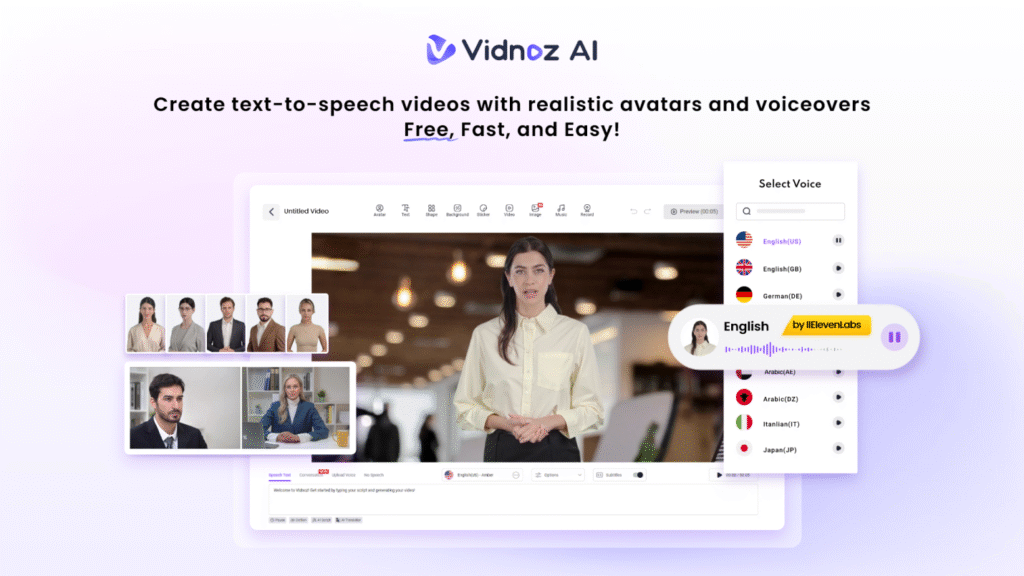
Vidnoz AI is a web-based application, where any person can create a video easily. It follows high security regulations and has attained the ISO/IEC 27001:2022 certification. This certification implies the safety and protection of your data which is ideal for most of the businesses.
You can produce videos with Vidnoz AI using AI presenters, pre-made templates, and natural-sounding voices. Above all, you do not have to install huge software or work with huge files as everything is operated online. Vidnoz AI is all about being fast, easy and ensuring that your information is safe. Therefore, you are able to make videos without hesitation.
Key Features That Save You Time and Money
Here are some amazing features of Vidnoz AI that you need to know.
Over 2000+ AI Voices with Lip Sync
Vidnoz AI provides over 2000+ natural-sounding AI voices of various tones, accents, and languages. Such voices and the ones fit the hand movements of your selected avatars perfectly.
So, you don’t need to hire voice actors. You can also update your script anytime and get new voiceovers instantly.
More than 2,800 Ready-Made Templates
The tool also contains more than 2,800 ready-to-use templates. You can use these templates for any type of video such as business explainers, tutorials, and announcements. There are several templates that work with numerous languages and you do not have to do any manual design work.
This ultimately helps in making video creation much faster.
Free Daily Video Creation
You can make up to two minutes of video for free every day. This is great for testing ideas, making quick updates, or trying out different video styles without spending any money at first.
Over 1,900 Realistic AI Avatars
Select from over 1,900 realistic avatars based on occupations, such as doctors, teachers, and hosts, as well as customer support agents, and so on. These avatars also assist you in getting your message across without necessarily filming real individuals.
Different Avatar Options in Vidnoz AI
Vidnoz AI gives you several ways to create avatars depending on what kind of video you want to make.
- Avatar Lite is quick and easy. Just pick an avatar, add your script, and make a video in minutes. It is perfect for simple videos like updates or short explanations.
- Custom Avatar Pro allows you to make a digital representation of yourself that can talk in more than 40 languages and sound as if it were your own voice. The background and style can also be changed. It is good with professional or branded videos.
- Motion Avatars include full body movements such as hand gesture, change of posture and facial features. This makes the videos more conversational and real. It is also possible to use cartoon-like motion avatars to make entertaining and creative videos.
These choices allow you to be more flexible for creating videos in your style and message.
How to Create Videos with Vidnoz AI?
Vidnoz AI makes video creation simple and fast, so you can share your message with confidence.
Sign Up or Log In
Start by creating an account or logging into Vidnoz AI. Once you are in, the main dashboard shows you templates, avatars, and your saved projects so you can start making videos right away. You don’t need to get into a long setup.
Choose a Template or Avatar
Look through the templates or pick an avatar that fits the style of your video. You can use filters to find options by language, role, or type of video. This is making it easy to get started with the perfect look.
Add Your Script and Customize
Paste your script into the editor and pick an AI voice that suits your message. You can also change the background and move text around. You can also adjust other visual details to make your video just right for your audience.
Preview and Make Edits
You can have a preview of the video content you created before finalizing your work. This step will also help you to make any changes you feel are necessary to make. This will help you to save time as you will need to redo the whole work otherwise.
Create and Share Your Video
Once you are happy with it, generate the final video. You can download it or share it directly on websites, company platforms, social media, or email campaigns.
Why Faster and Cheaper Video Creation Matters?
Video is now a key way teams communicate every day. Companies use videos for product demos, employee training, company news, and helping customers. But making traditional videos can be expensive and slow. Every time something changes, you might need new recordings and editing. This takes time and money. This makes it hard to update videos often.
- Making videos faster helps teams keep their information up to date. When rules change or products get new features, videos can be updated quickly instead of waiting weeks. This is especially important for growing businesses that need to keep up with their customers and employees.
- Lower costs also change how teams use video. Videos can be made regularly instead of one-time projects. Short explainers, quick updates, and simple guides become easy to create and share.
AI tools let you change and reuse videos without starting over every time. This saves time, reduces work, and keeps your message clear and consistent for everyone.
Final Thoughts
Vidnoz AI is a smart and affordable way to make videos quickly. It brings together easy-to-use AI voices, avatars, and templates all in one safe platform. It also helps in removing many of the challenges of traditional video making.
Vidnoz AI offers a simple and flexible tool that fits present fast-paced work style. This is true for teams and individuals who need to create videos often without spending a lot.